Tuesday, December 09, 2008

Microsoft SharePoint 2007 - SharePoint Designer Workflows does not automatically start

Today, I created a SharePoint Workflow with SharePoint Design 2007, selected the options for it to be started upon the creation of a new item and upon the modification of a new item. It didn't start!

However, if I enable the option to start the workflow manually, and do so, the workflow starts!

A google search lead me to an answer:


This behavior occurs because a security fix in Windows SharePoint Services 3.0 SP1 prevents declarative workflows from starting automatically under the system account. After you install Windows SharePoint Services 3.0 SP1, declarative workflows do not start automatically if the following conditions are true:

  • The Windows SharePoint Services Web application runs under a user's domain account.
  • The user logs in by using this domain account.
  • The site displays the user name as System Account.

Source: http://support.microsoft.com/kb/947284

Thursday, October 09, 2008

Microsoft Office SharePoint Server 2007 - My Sites and "Portal Site Connections" to change breadcrum behaviour

Summary
My Sites have proved to be a true value-add to any organisation as it does improve social personal information sharing (and alot more). It is easy to setup and logical to use.

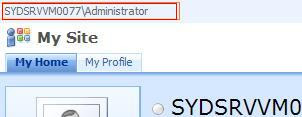
There are however still several glitches when it is first setup in an environment. For instance, many users have found that once they navigate to their MySite, there is no link in the breadcrum back to the main Intranet Portal (as illustrated below):

Luckily, there's a setting called "Portal site connections", once this setting is set, you would have modified the behaviour of your My Site breadcrums (as illustrated below):


Making the configuration change
Assuming we want to make this change to all My Sites under the current "My Site Host", we will need to perform the following steps:

1. Login to My Sites as the My Site Host owner (in my case this user is administrator)
2. Browse to the "My Profile" tab
3. Click "Site Actions"
4. Select "Site Settings" from the Site Actions menu (or http://mysiteurl/_layouts/settings.aspx)
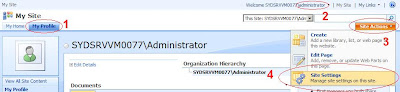


5. Click "Portal site connection" under Site Collection Administration
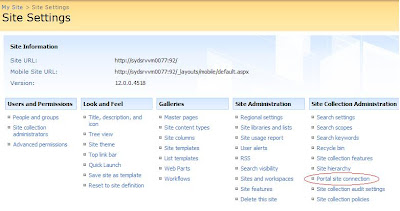

6. Select Connect to portal site and fill in a URL and link name (example illustrated below):
7. Click "OK"


Notes: When you now go back to the "My Profile" tab, you will see the change immediately. This change will only be valid for any new "My Sites" that are created (Not the MySite host or My Profile tab. Yes, personal sites aka the "My Home" tab) . For "My Home" tabs in existing "My Sites", you can either recreate the My Site, or make the same configuration via the following instructions:

1. Login to My Sites as the My Site Host owner (in my case this user is administrator)
2. Browse to the "My Home" tab
3. And follow from point 3 in the instructions above

Tuesday, September 09, 2008

Microsoft SharePoint 2007 - New SharePoint SDK

In the most recent MSDN flash are the following updates to take note of - some new SharePoint SDK releases:

Download the SharePoint Server 2007 SDK (Aug 08 1.4 Refresh)
The August 2008 update of the SharePoint Server 2007 SDK contains documentation for new and improved features in the Infrastructure Update for Microsoft Office Servers and new conceptual, procedural, and reference information. You can also
view the August update online.

Download the Windows SharePoint Services 3.0 SDK (Aug 08 1.4 Refresh)
See the latest additions to the Windows SharePoint Services SDK. Find conceptual overviews, programming tasks, and references for Windows SharePoint Services.
View the Windows SharePoint Services 3.0 SDK online.

Monday, September 08, 2008

Microsoft Office SharePoint Server 2007 - Best Practices Resource Center for SharePoint Server 2007

What is the best way to do something in SharePoint?

Recently, the SharePoint Team Blog announced the SharePoint Best Practices Series (http://blogs.msdn.com/sharepoint/archive/2008/08/29/announcing-the-sharepoint-best-practices-series.aspx).

The series includes a "Best Practices Resource Center for SharePoint Server 2007" site, which includes all guidelines about implementing Search, Publishing Portals, My Sites, Team Collaboration, SP Development, and more!
http://technet.microsoft.com/en-us/office/sharepointserver/bb736746.aspx

Tuesday, September 02, 2008

Tech-Ed Australia 2008

If you are going to Tech-Ed in Sydney this week, you can catch a few very interesting SharePoint/Search sessions:

  • OFC315 - Why Findability Should Be an Organising Principle for Your SharePoint Server 2007 Deployment. Presented by Ivan Wilson (SharePoint Gurus) and Ben Curry (MindSharp)
  • OFC301 - Form Processes in Minutes, not Months. Presented by Ivan Wilson (SharePoint Gurus) and Ben Walters (SDM).
  • MVP307 – SharePoint Monitoring – How to measure the success of your SharePoint implementation. Presented by Ivan Wilson (SharePoint Gurus)
  • OFC302 Stop Searching... Find it! With Microsoft Enterprise Search. Presented by Gayan Peiris (Microsoft)
  • OFC405 Creating Solutions with the Business Data Catalog. Presented by Ishai Sagi (Unique World)

Also another interesting one with Silverlight and SharePoint:

  • OFC303 Enhance the SharePoint User Interface with Silverlight 2.0. Presented by William Cornwill and Craig Harrowfield

Friday, July 18, 2008

Microsoft SharePoint 2007 - WSS and MOSS VPCs

I just discovered Microsoft provides VPC's for SharePoint evaluation. If you are a little lazy and don't already have a VPC, these maybe a good starting point:

Microsoft Office SharePoint Server 2007 VHD (24 July 2007):
http://www.microsoft.com/downloads/details.aspx?FamilyID=67f93dcb-ada8-4db5-a47b-df17e14b2c74&DisplayLang=en


Windows SharePoint Services 3.0 SP1 Developer Evaluation VPC Image (3 July 2008):
http://www.microsoft.com/Downloads/details.aspx?familyid=1BEEAC6F-2EA1-4769-9948-74A74BD604FA&displaylang=en

Thursday, July 17, 2008

Microsoft SharePoint 2007 - Changing service accounts and service account passwords in SharePoint

I was trying to change passwords for my VPC and I stumbled across these very nice articles.

This Microsoft KB talks about changing the service account/service account password for WSSv3 and MOSS2007:
http://support.microsoft.com/kb/934838

Joel Oleson's article talks about some additional tips including updating Search Service credentials:
http://blogs.msdn.com/joelo/archive/2006/08/22/712945.aspx

Tuesday, July 15, 2008

Microsoft CRM 4.0 - Browsing documents more effectively in Microsoft CRM 4.0

Ever thought browsing thru attachments in Microsoft CRM 4.0 was painful? You had to open the Entity window (ie. Contact/Account/Quotes...) and then go to the Notes tab, then scroll down to the attachment you need. Seems like alot of clicks to me.


Luckily, the guys at mscrm-addons.com released a tool a tool called "Document Summary". The "Document Summary" is available in the "Documents Core Pack for MS CRM 4.0", which includes a range of other tools such as WordMailMerge, SharePoint Integration, Send to PDF, and more.

I haven't used it myself yet, but I've seen the demo video. Here's how it looks like:


So far it looks pretty good. Point, click and browse. Simple, and very nicely done.

I don't work for mscrm-addons.com, so I'm not trying to sell their products.

For more information:
http://www.mscrm-addons.com/Products/AddonsforMSCRM40/DocumentsCorePack/tabid/130/Default.aspx

Microsoft SharePoint 2007 - Including/Excluding a list in the Search Index

Have the search results in your WSS/MOSS environment been ugly with all that list data? Did you want the content source to include content excluding list data?

In SharePoint, the content in each list can be configured to be included or excluded from being indexed in search crawls.

Through the SharePoint UI, this option is called "Allow items from this list to appear in search results?" and is located in the Advanced List Settings:


Through the SharePoint API, this option is exposed as a property called "NoCrawl" (for the list named "Hidden From Search List"):


SPSite site = new SPSite("http://siteurl");
SPWeb web = site.RootWeb;
SPList list = web.Lists["Hidden From Search List"];
list.NoCrawl = false;
list.Update();


After this property has been updated, the next time SharePoint Search crawls, it would skip indexing the list with a NoCrawl value of false.

Tuesday, July 01, 2008

Microsoft SharePoint 2007 and Microsoft CRM 4.0 - Custom Field Types for MS CRM 4.0

I came across a great article by Karine Bosch and Patrick Tisseghem about creating custom field types in SharePoint that exposes CRM 4.0 data via BDC. The first article includes a link to download the sample.

Here are the links:
Overview - http://www.u2u.info/Blogs/Patrick/Lists/Posts/Post.aspx?ID=1789
Detailed How To - http://www.u2u.be/Res/Article.aspx?ART=CRMSharePointCustomField

The highlight here is the ability for the user to search for a CRM record (whilst checking details on the record) to attach to a SharePoint list item.