Showing posts with label SharePoint 2007. Show all posts

Tuesday, February 02, 2010

Microsoft SharePoint 2007 – ItemAdded/ItemAdding List Event Receivers and SPFieldUserValue.User not returning SPUser


The Problem
I recently had to develop an Event Receiver that would require reading off the SPUser object of the item. What I found is that, at times when the exact name of the user is entered (and you click OK on the NewForm.aspx page without clicking the check name image  button), the SPFieldUserValue will return

–1;#domain\username

rather than

23;#domain\username.
 image

This is a problem when you try to access the SPFieldUserValue.User (SPUser type) property and it returns null.

The Solution
The solution was to get the SPFieldUserValue as a string, and then use the username to then try and resolve for the SPUser object. My rough cut out code is attached – quickly modified for this example. (*Use at your own risk. Is also why I don’t usually post code on my blog!)

Wednesday, August 05, 2009

MOSS 2007 – User Profile Imports and LDAP Cheat Sheet


I’ve tried to get an instance importing but still with no luck – there must be something else preventing it from importing… Anyways, I decided to write down my research for the day:

Default SharePoint settings are:

Search Base: dc=domain,dc=company,dc=com
Base Query: (&(objectCategory=person)(objectClass=user))

Options:

Options for Search Base:
-
Can define a specific OU to base the import on. eg. ou=Sydney,ou=Department1,dc=domain,dc=company,dc=com

Options for LDAP Filter Query:
Get all accounts with email address:
(&(objectCategory=Person)(objectClass=User)(!(userAccountControl:1.2.840.113556.1.4.803:=2))(email=*))

Get active accounts – filter our disabled AD accounts:
(&(objectCategory=person)(objectClass=user)(!userAccountControl:1.2.840.113556.1.4.803:=2))

Get accounts in the Department1 OU:
(&(objectCategory=Person)(objectClass=User)(memberof:1.2.840.113556.1.4.1941:=(CN=Authenticated Users,OU=Department1,DC=domain,dc=company,dc=com)))

Get accounts with a first name:
(&(objectCategory=Person)(objectClass=User)(!(userAccountControl:1.2.840.113556.1.4.803:=2))(!(!givenName=*)))


Good References:
Scope of Query – Base, One Level, Subtree: http://msdn.microsoft.com/en-us/library/aa746467%28VS.85%29.aspx

LDAP Search Filter Syntax:
http://msdn.microsoft.com/en-us/library/aa746475%28VS.85%29.aspx

Importing Specific group into SP User Profile Store with LDAP:
http://mindsharpblogs.com/wayne/archive/2005/06/15/497.aspx

LDAP Attributes:
http://www.computerperformance.co.uk/Logon/LDAP_attributes_active_directory.htm#LDAP_Attribute_

A Nice LDAP Attribute Table:
http://www.it.ufl.edu/projects/directory/ldap-schema/attributes.html

Thursday, July 02, 2009

Microsoft SharePoint 2007 – Renaming a MOSS Server


This is the N-the time I’ve had to rename a SharePoint server, and every time I keep on forgetting the exact steps… so these are notes for the (Technical) me.

  1. Change each alternate access mapping for MOSS 2007/WSSv3 deployment in Central Admin reflecting new server name
  2. Register the change with SharePoint, using:

    stsadm -o renameserver -newservername <newname> -oldservername <oldname>


  3. Rename server in Windows
  4. Restart server
  5. Post restart, update SharePoint farm credentials using:

    stsadm -o updatefarmcredentials -userlogin <domain\domainuser> -password <password>


  6. Run an iisreset
  7. Check the accounts used in application pools within IIS, update to reflect new machine name accounts
  8. Rebuild the search index (remove and recreate)
  9. Operation Complete!

Source: http://www.sharepointblogs.com/mirjam/archive/2007/08/06/renaming-a-moss-server.aspx (Thank you Mirjam)

Wednesday, June 24, 2009

Microsoft SharePoint 2007 – An iPhone Client to view SP Content?

SharePoint comes standard with the support for mobile browsing – and if you’ve used it, you would have to say it does the job. But what if you now you feel like bringing surfacing the information on an iPhone (Besides browsing SharePoint sites directly from Safari)? The product would no doubt be a very attractive app for use on the go.

So recently, I stumbled across quiet an interesting product ‘iShare’ from Spyk software: A SharePoint Client App for the iPhone.

The iShare app allows users to login using Windows Authentication or SharePoint Forms Authentication and view, search and create content within a SharePoint Site. There is a list of files which this little app can open:

  • Adobe Acrobat (.pdf)
  • Microsoft Word (.doc, .docx)
  • Microsoft Powerpoint (.ppt, .pptx)
  • Microsoft Excel (.xls, .xslx)
  • Images (.jpeg, .jpg, .tiff, .gif)
  • Web pages (.html, .htm, .aspx)
  • Text Files (.txt)
  • Contacts (.vcf)
  • Now, I do not have an iPhone neither have I used this application – so I cannot comment on the product… so give it a shot and leave a comment :) Apparently you can get it on the iPhone Apps Store.

    http://www.spyk.com/Products/iShare/Pages/iShare.aspx

    Here are some screenshots from the iShare site:

    Wednesday, April 08, 2009

    Microsoft SharePoint 2007 - Fixing a failed WSS v3 and/or MOSS 2007 SP1/Infrastructure Patch Upgrade

    The Upgrade Process
    I was upgrading an environment (MOSS version 12.0.0.4815) in the following manner:
    1. Check all Timer jobs have run to completion in the existing environment
    2. Check no errors with WSP
    3. Install WSS v3 SP1 Patch (Skip Configuration wizard)
    4. Install MOSS 2007 SP1 Patch (Skip Configuration wizard)
    5. Install WSS v3 infrastructure Patch (Skip Configuration wizard)
    6. Install MOSS 2007 infrastructure Patch
    7. Following the prompts for the Configuration Wizard (PSconfigUI).

    Okay, so far so good.

    The Problems
    In the middle of the configuration wizard, it seemed to have stayed on Step 5 for hours. Looking at the Event Viewer, errors with messages:

    Content index on Search could not be initialized. Error The content index is corrupt. 0xc0041800.Component: bd72df39-396a-472f-8a1a-db6c3241e922


    Checking Upgrade.log (in 12\Logs\), unveiled some Exception errors.

    The Solution
    So then I cancelled out of the setup (which took a while to cancel – actually it didn’t cancel until I ran the following command), and ran the following command to force the upgrade of the SharePoint environment:

    psconfig -cmd upgrade -force


    Checked the version numbers and the existing sites I had - That seemed to have fixed my issues


    Alternative
    Alternatively, the stsadm utility can be used (though I didn't have to use it):

    stsadm -o upgrade -forceupgrade

    For more details on this command:
    Upgrade: Stsadm operation (Windows SharePoint Services)
    http://technet.microsoft.com/en-us/library/cc288073.aspx

    Upgrade: Stsadm operation (Office SharePoint Server)
    http://technet.microsoft.com/en-us/library/cc263413.aspx


    References
    Command-line reference for the SharePoint Products and Technologies Configuration Wizard (Office SharePoint Server)
    http://technet.microsoft.com/en-us/library/cc263093.aspx

    Install Windows SharePoint Services 3.0 by using the command line
    http://technet.microsoft.com/en-us/library/cc752946.aspx

    Thursday, April 02, 2009

    Microsoft SharePoint - Version numbers

    It's been the Nth time I've had to checkup the version of SharePoint that is installed on a Farm - and I am now finally keeping this here for my own notes.

    All these times I've been hitting back on a very nice post by Penny Coventry that contains a list of SharePoint Patches and respective version numbers:
    http://www.mindsharpblogs.com/penny/articles/481.aspx

    The easiest ways I use to check version numbers are:
    1. In Central Admin, Site Actions > Site settings:


    OR

    2. In IIS, right click on the web application and select properties > 'HTTP Headers' tab, under Custom HTTP Headers section:

    Monday, March 09, 2009

    Microsoft SharePoint 2007 - Understanding performance considerations in SharePoint OM

    A colleague, Fernando Felman has highlighted a very useful and interesting blog spot by Andreas Grabner that walks-thru scenarios and looks into the performance of SharePoint when under various SharePoint object model calls.

    Though quite a few points in the post are obvious to the developer, I still think it is worth a good read :)

    The article:
    SharePoint Object Model Performance Considerations
    http://www.infoq.com/articles/SharePoint-Andreas-Grabner

    Saturday, February 21, 2009

    Microsoft SharePoint 2007 - SharePoint Lookup Field Relinker Utility

    I've had a dig into my code stash, and found that I actually have a tool to help reassociate SharePoint lookup fields to lists. You'd only every really need to reassociate if the list referenced by the lookup field has an altered GUID. The GUID of a list would change if it has been deleted, or if you migrate a list from one environment to another.

    I'm quiet flat out atm, so I'll post some more information in the next week or so with instructions on how to use this tool.

    Background
    This tool was used as part of a migration plan across servers using site backup and restore. The restored site ended up with lists that had lookups that did not associate with the appropriate columns. This is because the ID of the list in the new environment is different after a restore. Therefore the stored lookup field definition will no long be validly pointing to the correct ID of the list column that it was associated with - hence the need for this tool to reassociate such lookup fields with the relevant list columns that it references from.

    Hopefully this little tool could help save alot of pain in migrating lookup fields in lists.


    Some notes on the utility:
    --------------------------------------------------------------------------------------
    This tool was developed to reassociate or fix SharePoint lookup fields to lists in a site.

    This tool is able to:
    1. Relink lookup fields
    2. Relink multiple lookup fields from an XML definition (Bulk tasks)
    3. View Field Schema

    This tool is useful in the following scenarios:
    1. A list a lookup field is pointing to has been deleted and needs to be linked to a different field in a different list
    2. A site backup is made and is restored in a different environment - The lookup fields will no longer link to
    the field even thought the appropriate lists may be created. This tool will help relink the fields

    Requirements for this tool to run:
    1. Must login as Site Administrator - as the code will delete the lookup field and recreate it (Did not use RunWithElevatedPrivileges() for security purposes.)
    2. Tool must be run on a WSS v3.0 or MOSS 2007 Server directly
    3. Sorry, this tool has only been tested on an English environment - but theoretically should still work
    with other localisations of SharePoint instances.

    Where to download:
    http://www.codeplex.com/SPLookupLinker

    Tuesday, January 20, 2009

    Microsoft SharePoint 2007 - Calculated fields VS Computed fields

    Audience
    This article is intended for SharePoint Developers. Non-Developers, can understand what SharePoint can do thru this article. As I couldn't find much about this topic on the net, I thought I'd write about it :)

    Introduction

    SharePoint, being apart of Office, inherits a feature that is familiar amongst Microsoft Excel users - aka the "Calculated Field", which allows the user to specify a formula to determine the value of a field based on the value of other fields.

    Recently I've had a go at trying to combine multiple reference fields into one field in SharePoint. Whilst there are many ways to do it (with an event handler, workflow, or calculated fields), I'd like to present to you a very clean solution based on a "Computed Field" type.

    Computed fields are used by standard SharePoint components. For example, in a Blog Site there is a list named "Posts". This list contains a field called "PostedByWithDate" - which is a combination of a "Published" date-time field and a "Created By" person field. The output not only contains a combination of "Publised" and the "Created By" values but also includes custom text:


    To show you what I mean, this is the "Posts" list, and their values:


    Time to Play with Computed Fields
    So what can we do with this? We can set the value of a computed field conditionally thru some field reference definitions!

    Lets start by looking at the definition for the computed field (I'll assume you read the SDK to understand this):
    <Field Name="OnBehalfOf" ID="{e9d780a5-ac18-4a04-ad63-39c6a7417212}" DisplayName="OnBehalfOf" Type="User" Required="FALSE" SourceID="http://schemas.microsoft.com/sharepoint/v3" List="UserInfo"
    Description="Use this field when you are posting on behalf of the blog owner" ShowField="ImnName" UserSelectionMode="PeopleOnly" UserSelectionScope="0" StaticName="OnBehalfOf" ColName="int3" RowOrdinal="0" />


    Original
    The original field definition for the PostedByWithDate field (Which I extracted from the SharePoint Blog Site Definition contains):

    <Field Name="PostedByWithDate" ID="{a1944d80-14e6-a71c-b235-3a28329f14b1}" Type="Computed" ReadOnly="TRUE" DisplayName="$Resources:posts_schema_blgfld_postedbywithdate;" Sortable="FALSE" SourceID="http://schemas.microsoft.com/sharepoint/v3"
    StaticName="PostedByWithDate">
    <FieldRefs>
    <FieldRef Name="Author" />
    <FieldRef Name="PublishedDate" />
    </FieldRefs>
    <DisplayPattern>
    <HTML><![CDATA[Posted at ]]></HTML>
    <Column Name="PublishedDate" Format="TimeOnly" HTMLEncode="TRUE" />
    <HTML><![CDATA[ by ]]></HTML>
    <Field Name="Author" />
    </DisplayPattern>
    </Field>


    SharePoint Magic
    Now what I did was create a copy of this column (in a new Site Template - remember it is not supported only if you modify existing SharePoint Site Templates), and modified it like the following:

    <Field Name="PostedByWithDate" ID="{a1944d80-14e6-a71c-b235-3a28329f14b1}" Type="Computed" ReadOnly="TRUE" DisplayName="$Resources:posts_schema_blgfld_postedbywithdate;" Sortable="FALSE" SourceID="http://schemas.microsoft.com/sharepoint/v3"
    StaticName="PostedByWithDate">
    <FieldRefs>
    <FieldRef Name="Author" />
    <FieldRef Name="OnBehalfOf" />
    <FieldRef Name="PublishedDate" />
    </FieldRefs>
    <DisplayPattern>
    <HTML><![CDATA[Posted at ]]></HTML>
    <Column Name="PublishedDate" Format="TimeOnly" HTMLEncode="TRUE" />
    <HTML><![CDATA[ by ]]></HTML>
    <IfEqual>
    <Expr1>
    <Column Name="OnBehalfOf" HTMLEncode="FALSE" />
    </Expr1>
    <Expr2></Expr2>
    <Then><Field Name="Author" /></Then>
    <Else><Field Name="OnBehalfOf" /></Else>
    </IfEqual>
    </DisplayPattern>
    </Field>

    The node is used for fields to allow for custom presentation of information. nodes can be added to introduce logical conditions for how data is presented. gives the field if-else logic; in this case, it checks if the value of the "OnBehalfOf" field is equal to nothing, and if it is, return the value from the "Author" field, else return the value from the "OnBehalfOf" field.

    Very straight forward indeed :) The result can be seen in the screen shots above - when the OnBehalfOf field is blank, the value in the "Created by" field is shown with the date.


    Some References:
    Field Element: http://msdn.microsoft.com/en-us/library/ms437580.aspx
    DisplayPattern Element: http://msdn.microsoft.com/en-us/library/ms977561.aspx
    IfEqual Element: http://msdn.microsoft.com/en-us/library/ms948315.aspx


    Tuesday, December 09, 2008

    Microsoft SharePoint 2007 - SharePoint Designer Workflows does not automatically start

    Today, I created a SharePoint Workflow with SharePoint Design 2007, selected the options for it to be started upon the creation of a new item and upon the modification of a new item. It didn't start!

    However, if I enable the option to start the workflow manually, and do so, the workflow starts!

    A google search lead me to an answer:


    This behavior occurs because a security fix in Windows SharePoint Services 3.0 SP1 prevents declarative workflows from starting automatically under the system account. After you install Windows SharePoint Services 3.0 SP1, declarative workflows do not start automatically if the following conditions are true:

    • The Windows SharePoint Services Web application runs under a user's domain account.
    • The user logs in by using this domain account.
    • The site displays the user name as System Account.

    Source: http://support.microsoft.com/kb/947284

    Thursday, October 09, 2008

    Microsoft Office SharePoint Server 2007 - My Sites and "Portal Site Connections" to change breadcrum behaviour

    Summary
    My Sites have proved to be a true value-add to any organisation as it does improve social personal information sharing (and alot more). It is easy to setup and logical to use.

    There are however still several glitches when it is first setup in an environment. For instance, many users have found that once they navigate to their MySite, there is no link in the breadcrum back to the main Intranet Portal (as illustrated below):
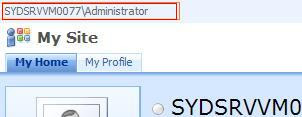

    Luckily, there's a setting called "Portal site connections", once this setting is set, you would have modified the behaviour of your My Site breadcrums (as illustrated below):


    Making the configuration change
    Assuming we want to make this change to all My Sites under the current "My Site Host", we will need to perform the following steps:

    1. Login to My Sites as the My Site Host owner (in my case this user is administrator)
    2. Browse to the "My Profile" tab
    3. Click "Site Actions"
    4. Select "Site Settings" from the Site Actions menu (or http://mysiteurl/_layouts/settings.aspx)
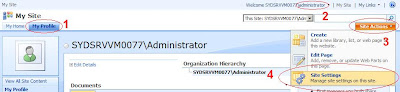


    5. Click "Portal site connection" under Site Collection Administration
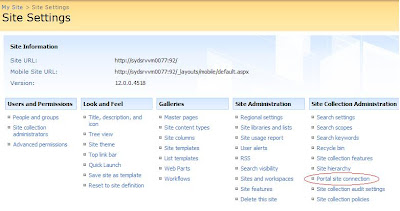

    6. Select Connect to portal site and fill in a URL and link name (example illustrated below):
    7. Click "OK"


    Notes: When you now go back to the "My Profile" tab, you will see the change immediately. This change will only be valid for any new "My Sites" that are created (Not the MySite host or My Profile tab. Yes, personal sites aka the "My Home" tab) . For "My Home" tabs in existing "My Sites", you can either recreate the My Site, or make the same configuration via the following instructions:

    1. Login to My Sites as the My Site Host owner (in my case this user is administrator)
    2. Browse to the "My Home" tab
    3. And follow from point 3 in the instructions above

    Tuesday, September 09, 2008

    Microsoft SharePoint 2007 - New SharePoint SDK

    In the most recent MSDN flash are the following updates to take note of - some new SharePoint SDK releases:

    Download the SharePoint Server 2007 SDK (Aug 08 1.4 Refresh)
    The August 2008 update of the SharePoint Server 2007 SDK contains documentation for new and improved features in the Infrastructure Update for Microsoft Office Servers and new conceptual, procedural, and reference information. You can also
    view the August update online.

    Download the Windows SharePoint Services 3.0 SDK (Aug 08 1.4 Refresh)
    See the latest additions to the Windows SharePoint Services SDK. Find conceptual overviews, programming tasks, and references for Windows SharePoint Services.
    View the Windows SharePoint Services 3.0 SDK online.

    Monday, September 08, 2008

    Microsoft Office SharePoint Server 2007 - Best Practices Resource Center for SharePoint Server 2007

    What is the best way to do something in SharePoint?

    Recently, the SharePoint Team Blog announced the SharePoint Best Practices Series (http://blogs.msdn.com/sharepoint/archive/2008/08/29/announcing-the-sharepoint-best-practices-series.aspx).

    The series includes a "Best Practices Resource Center for SharePoint Server 2007" site, which includes all guidelines about implementing Search, Publishing Portals, My Sites, Team Collaboration, SP Development, and more!
    http://technet.microsoft.com/en-us/office/sharepointserver/bb736746.aspx

    Friday, July 18, 2008

    Microsoft SharePoint 2007 - WSS and MOSS VPCs

    I just discovered Microsoft provides VPC's for SharePoint evaluation. If you are a little lazy and don't already have a VPC, these maybe a good starting point:

    Microsoft Office SharePoint Server 2007 VHD (24 July 2007):
    http://www.microsoft.com/downloads/details.aspx?FamilyID=67f93dcb-ada8-4db5-a47b-df17e14b2c74&DisplayLang=en


    Windows SharePoint Services 3.0 SP1 Developer Evaluation VPC Image (3 July 2008):
    http://www.microsoft.com/Downloads/details.aspx?familyid=1BEEAC6F-2EA1-4769-9948-74A74BD604FA&displaylang=en

    Thursday, July 17, 2008

    Microsoft SharePoint 2007 - Changing service accounts and service account passwords in SharePoint

    I was trying to change passwords for my VPC and I stumbled across these very nice articles.

    This Microsoft KB talks about changing the service account/service account password for WSSv3 and MOSS2007:
    http://support.microsoft.com/kb/934838

    Joel Oleson's article talks about some additional tips including updating Search Service credentials:
    http://blogs.msdn.com/joelo/archive/2006/08/22/712945.aspx

    Tuesday, July 15, 2008

    Microsoft SharePoint 2007 - Including/Excluding a list in the Search Index

    Have the search results in your WSS/MOSS environment been ugly with all that list data? Did you want the content source to include content excluding list data?

    In SharePoint, the content in each list can be configured to be included or excluded from being indexed in search crawls.

    Through the SharePoint UI, this option is called "Allow items from this list to appear in search results?" and is located in the Advanced List Settings:


    Through the SharePoint API, this option is exposed as a property called "NoCrawl" (for the list named "Hidden From Search List"):


    SPSite site = new SPSite("http://siteurl");
    SPWeb web = site.RootWeb;
    SPList list = web.Lists["Hidden From Search List"];
    list.NoCrawl = false;
    list.Update();


    After this property has been updated, the next time SharePoint Search crawls, it would skip indexing the list with a NoCrawl value of false.

    Tuesday, July 01, 2008

    Microsoft SharePoint 2007 and Microsoft CRM 4.0 - Custom Field Types for MS CRM 4.0

    I came across a great article by Karine Bosch and Patrick Tisseghem about creating custom field types in SharePoint that exposes CRM 4.0 data via BDC. The first article includes a link to download the sample.

    Here are the links:
    Overview - http://www.u2u.info/Blogs/Patrick/Lists/Posts/Post.aspx?ID=1789
    Detailed How To - http://www.u2u.be/Res/Article.aspx?ART=CRMSharePointCustomField

    The highlight here is the ability for the user to search for a CRM record (whilst checking details on the record) to attach to a SharePoint list item.

    Microsoft SharePoint 2007 - Sample Event Handler to set Permissions

    I recently had to dig up something I learnt in the past so, here it is - a good example posted by Ishai Sagi to show a great example for:
    • Getting a list item in the event handler
    • Impersonating another user totally (without using RunWithElevatedPrivilages)
    • Changing permissions for an item
    • Creating a new permission role in a web site
    • Checking if a role exists or not

    http://www.sharepoint-tips.com/2007/03/sample-event-handler-to-set-permissions.html

    Sunday, June 29, 2008

    Microsoft Windows SharePoint Services 3.0 - Saving a Site as a Site Template

    There's a page in SharePoint that allows you to save a Site directly as a Site Template to the Site Templates Gallery. The URL is http://(sharepoint site)/_layouts/savetmpl.aspx

    Apparently, there is no link in the settings page to this url in SharePoint.

    With this, you can customise a site, and then save it as a template for future use. This serves as an alternative to using the stsadm backup and restore command.

    Here's a screenshot of what the page looks like.

    Tuesday, June 17, 2008

    Microsoft SharePoint 2007 - SharePoint Branding Tool v1.7.0 (Custom tool for themes, masterpages, site logos...)

    This is an update for this article.

    I've been quiet busy recently but I was still able to squeeze some time into improving this tool. I can't think of anymore to improve on without over-doing it. That being said, feel free to send me a post on my blog for suggestions. I hope it will be a useful tool.

    You can get the tool at codeplex

    http://www.codeplex.com/BrandingTool.

    Here is the readme:

    SharePoint Branding Tool v1.7.0 Released

    This tool can be used apply the following actions for multiple Site Collections, and Child Sites:

    -modify Themes,
    -modify MasterUrl (Master Page),
    -modify CustomMasterUrl (System Master Page),
    -modify SiteLogoUrl (Site Logo),
    -modify SiteLogoDescription (Site Logo Alternative Text),
    -modify AlternateCssUrl (Custom CSS Style Sheet)
    -view various properties of sites and themes at a glance

    Selection of sites can be filtered by the Site Template used.

    In this version I have made the following enhancements from feedback:
    -UI Improvement: Less intrusive messages
    -UI Improvements: Status Strip for operation reporting, etc
    -Different SharePoint language version support (Dynamic install path support - for Spanish support)
    -Improved error message reporting
    -Improved operation reporting
    -Configuration file support


    And here are some screen shots of the new app:


    Remember the tool not only does the job using the SharePoint Object Model, but it also allows you to do it through the SharePoint UI:


    You can get the tool at codeplex

    http://www.codeplex.com/BrandingTool.